
Topics Covered
- What Are Perps?
- Why Use Perps in Trust Wallet?
- How to Start Trading Perps
- Understanding Key Terms
- Risk Reminder
- FAQs
- Disclaimer
What Are Perps?
Perpetual futures — or “Perps” — let you trade crypto price movements without owning the token itself.
You can open a long position if you think the price will go up, or a short position if you expect it to go down.
Perps don’t expire, so your trade stays open until you close it or your margin runs out.
With leverage, you can control a larger position using a smaller amount of capital — but remember, leverage also increases risk.
For additional information on perp trading and leverage, visit: What is perp trading and leverage?
Why Use Perps in Trust Wallet?
Perps in Trust Wallet give you access to perpetual trading directly inside your app, powered by Aster DEX.
You stay fully in control of your funds at all times — no accounts, no centralized custody, and no KYC.
Key benefits:
- Trade with up to 100× leverage
- Go long or short on 100+ markets
- Keep full self-custody of your assets
- Use your existing wallet — no external logins
- Fast, seamless trading through the familiar Swaps tab
Perps are currently available on BSC, Ethereum, and Arbitrum, with more networks coming soon.
Before You Start
Make sure you’re using the latest version of Trust Wallet: Download or update Trust Wallet
Perpetuals are not available to users in the United States or the United Kingdom, and may be restricted in other regions.
How to Start Trading Perps
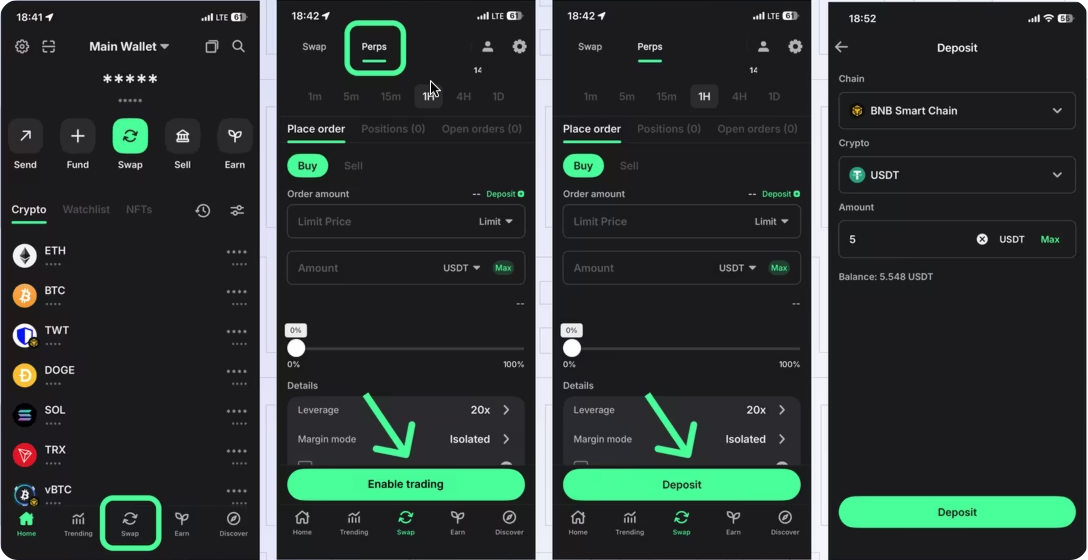
Step 1 — Open the Perps Screen
- Open Trust Wallet.
- Tap Swap on the bottom menu.
- Select the Perps tab.
- If it’s your first time, tap Enable Trading and complete the setup process.
Step 2 — Deposit Margin
Before you trade, you’ll need to deposit funds as collateral (your margin).
- Tap Deposit on the Perps screen.
- Choose your preferred network (BSC, Ethereum, or Arbitrum).
- Select the asset and amount you want to deposit.
- Confirm. Your deposit usually appears within a few minutes.
You can also deposit by tapping the account icon in the top-left corner and selecting Deposit.
Step 3 — Open a Trade
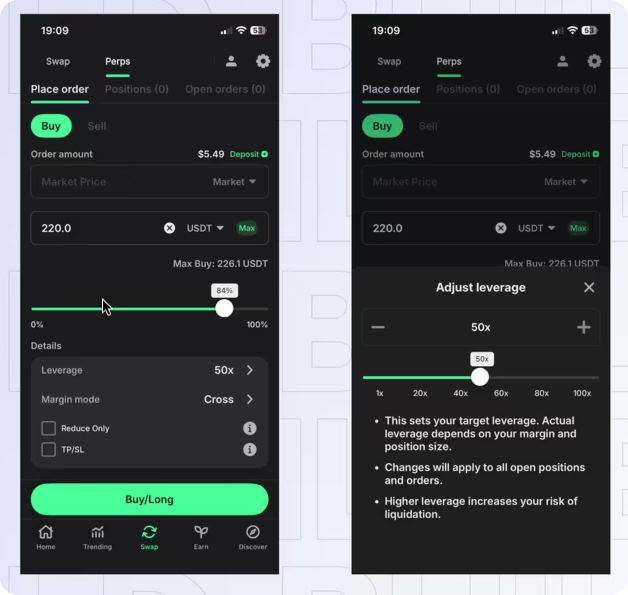
Now you’re ready to open your first position.
- Choose a trading pair (for example, BTC/USDT).
- Pick your order type:
- Market Order: Buy or sell instantly at the best available price.
- Limit Order: Set your desired price — your order executes only if the market reaches it.
- Set the amount you want to trade.
- Choose your leverage (up to 100×, depending on the market).
- Select your margin mode:
- Isolated: Only the margin for this trade is at risk (recommended for beginners).
- Cross: All your balance is shared across trades (more flexible, higher risk).
- (Optional) Add Take Profit (TP) and Stop Loss (SL) levels to manage your risk automatically.
- Review your setup, then tap Confirm to place the trade.
Your position opens once the order is filled. Market orders fill instantly; limit orders wait until your target price is reached.
Step 4 — Manage Your Trade
You can view and manage your open positions from the Perps screen:
- Monitor your real-time profit and loss.
- Adjust leverage
- Cancel open orders.
Step 5 — Close or Exit Your Trade
You can close your position in three ways:
- Manually: Place the opposite order (sell to close a long, or buy to close a short).
- Automatically: Use your Take Profit or Stop Loss settings.
- Liquidation: If your losses reach your margin, your position is automatically closed to prevent further loss.
Step 6 — Withdraw Your Funds
To move funds back to your main wallet:
- Tap the account icon (top left).
- Choose Withdraw.
- Select the network, asset, and amount.
- Confirm the withdrawal.
Understanding Key Terms
Margin
The amount you deposit to open a position. It’s your collateral — if the market moves against you, losses are taken from this margin.
Leverage
Lets you trade larger positions with less capital. For example, 10× leverage means a 1% price move equals a 10% gain or loss.
Liquidation
If your losses use up your margin, your position closes automatically. You lose only your margin, not your entire wallet balance.
Take Profit / Stop Loss (TPSL)
These automatically close your trade at a chosen profit or loss level — helping you manage risk.
Reduce-Only Orders
Used to safely decrease or close a position without accidentally opening a new one.
Risk Reminder
Perpetual trading involves high risk and is best suited for experienced users.
Leverage can magnify both gains and losses, and liquidation can result in losing your entire margin.
Trade responsibly and only with funds you can afford to lose.
FAQs
Do I need an Aster account to trade?
No. Perps in Trust Wallet use the Aster DEX via an off-chain relay, with no logins or accounts required.
Are my funds safe?
Yes. Trust Wallet is non-custodial — you keep your private keys and always control your funds.
Which assets can I trade?
You can open long or short positions on 100+ crypto pairs. Available markets are displayed in the Perps tab.
Is there a minimum trade amount?
Yes. The minimum order size depends on the market, but you can use leverage to open smaller positions.
Where is Perps available?
Perps are available in most regions except the United States and the United Kingdom. Availability may vary by location.
Disclaimer
Perpetual trading is a high-risk activity. Trust Wallet provides access to decentralized protocols like Aster DEX through a non-custodial interface.
Availability varies by jurisdiction. This article is for educational purposes only and does not constitute investment advice.
Was this article helpful?
That’s Great!
Thank you for your feedback
Sorry! We couldn't be helpful
Thank you for your feedback
Feedback sent
We appreciate your effort and will try to fix the article