
Trust Wallet now supports EIP-7702 with FlexGas, allowing you to pay gas fees using TWT, USDT, and USDC (in addition to native tokens like ETH and BNB).
With FlexGas, you get a more flexible and convenient way to pay for gas fees on supported networks
What Is FlexGas?
FlexGas lets you pay for network gas fees using supported tokens — including TWT, USDT, USDC, and USDC.e — alongside native tokens such as ETH, BNB, OP, and ARB.
Key benefits:
No need to hold separate native tokens for gas
Fewer failed transactions caused by insufficient gas
A smoother, more intuitive wallet experience
How It Works
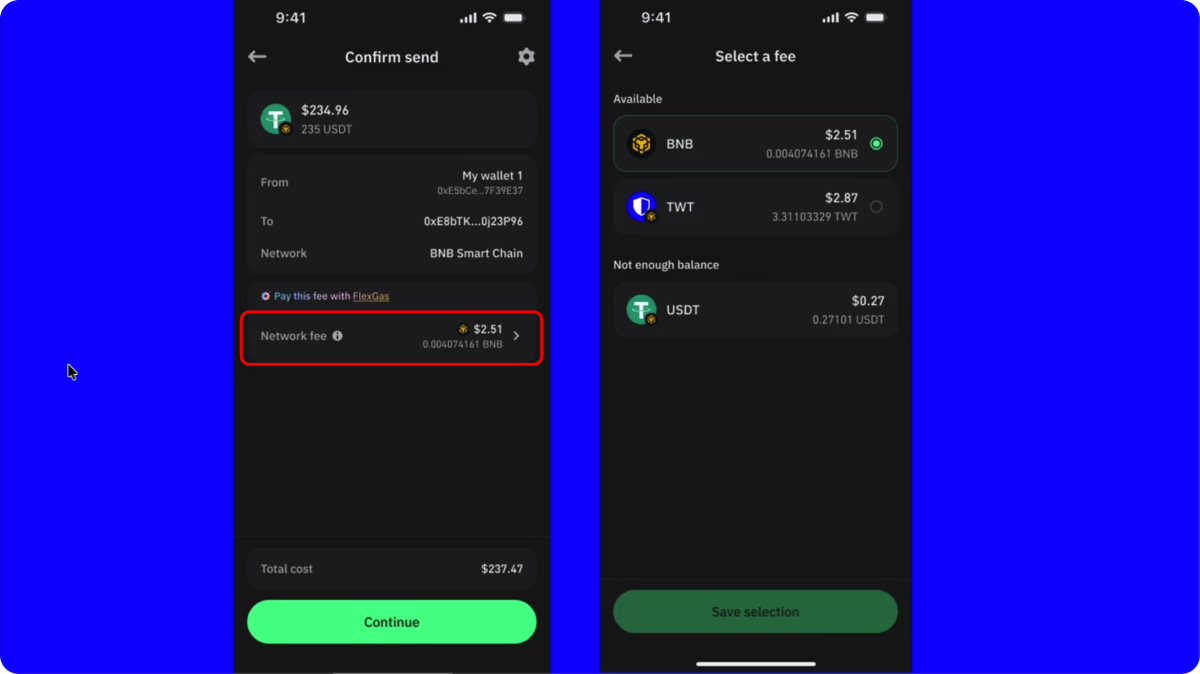
For Sending Crypto
Open Trust Wallet.
Start a send transaction as usual.
Tap Network Fee.
Select the token you want to use to pay gas.
Confirm the transaction — Trust Wallet handles everything securely behind the scenes.
For Swapping Crypto
Open Trust Wallet.
Tap Swap.
Choose your source and destination tokens (same-chain swaps within BNB Chain or Ethereum).
Select your preferred token (TWT, USDT, USDC, or USDC.e) to pay gas.
Confirm the swap — Trust Wallet takes care of the rest.
Behind the scenes, EIP-7702 enables your Externally Owned Account (EOA) to act temporarily like a smart account. This allows for alternative gas payments while ensuring your wallet remains self-custodial at all times.
Learn more: EOA vs. Smart Contract Wallets
Supported Actions
You can currently use FlexGas for:
Sending tokens
Swapping tokens (same-chain swaps on BNB Chain and Ethereum)
Update your Trust Wallet app to the latest version to access FlexGas.
Supported Tokens
FlexGas currently supports:
TWT
USDT
USDC
USDC.e
More supported tokens will be added in future updates.
Multi-Chain Support
FlexGas is currently available on:
BNB Smart Chain (BSC)
Ethereum
Arbitrum
OP Mainnet (Optimism)
Base
Additional network integrations are in development.
Security First
At Trust Wallet, your security always comes first.
FlexGas follows the same self-custodial model — meaning you own your keys and control your funds.
Even though FlexGas uses EIP-7702 to enable advanced functionality, your private keys never leave your device. Every transaction still requires your explicit approval.
Security Highlights:
Delegation is restricted to Trust Wallet’s secure infrastructure — eliminating third-party risk.
No new seed phrases or keys are generated.
No external contract approvals are required.
The feature is fully opt-in and under your control.
Security is built into FlexGas from the ground up — not added as an afterthought.
Best Practices & Notes
Your selected gas token (TWT, USDT, USDC, or USDC.e) must be held in the same wallet address you’re transacting from.
You can still choose to pay gas with the native token if you prefer.
Always update your Trust Wallet app to the latest version for the best experience.
Your private key always remains in control — FlexGas never compromises your security.
Frequently Asked Questions (FAQ)
1. What is FlexGas in Trust Wallet?
FlexGas is a new feature that allows you to pay gas fees using supported tokens like TWT, USDT, or USDC — instead of native tokens such as ETH or BNB.
2. Is FlexGas secure?
Yes. FlexGas is built on Trust Wallet’s self-custodial foundation. Your private keys remain on your device, and all transactions require your explicit approval.
3. Which tokens can I use to pay gas?
Currently, you can pay gas with TWT, USDT, USDC, or USDC.e, in addition to native tokens.
4. Which networks support FlexGas?
FlexGas is available on BNB Smart Chain, Ethereum, Arbitrum, Optimism, and Base.
5. Do I need to update my app to use FlexGas?
Yes. Make sure your Trust Wallet app is updated to the latest version to access the FlexGas feature.
Was this article helpful?
That’s Great!
Thank you for your feedback
Sorry! We couldn't be helpful
Thank you for your feedback
Feedback sent
We appreciate your effort and will try to fix the article