
Vietnamese Customers Only
Note:
This service will be discontinued on 31 March 2026 at 2:00 PM UTC+8.
We're always looking for ways to make your Web3 experience even smoother, and that's why we're excited to introduce QR Pay on Trust Wallet powered by Wello. This innovative feature allows you to make quick, secure, and straightforward crypto payments by simply scanning a QR code.
This guide will walk you through everything you need to know about QR Pay, answering some of your most common questions.
What is Crypto QR Pay and How Does It Work?
QR Pay lets you conveniently make payments directly from your Trust Wallet balance using the stablecoin USDT on the BSC network.
Here’s how it works: you'll simply scan a merchant's unique QR code, confirm the transaction details and amount within your app, and your crypto payment is processed on-chain instantly. It's a quick and secure way to use your digital assets in the real world.
In Vietnam, this works seamlessly with VietQR, the national QR standard. VietQR follows global EMVCo standards and the guidelines set by the State Bank of Vietnam. It’s the same QR that users already scan through bank apps, ZaloPay, and more.
What Countries Are Supported for QR Pay?
We're rolling out QR Pay strategically to ensure the best user experience. Currently, QR Pay is available only in Vietnam. We're actively working to expand our reach, and more regions will be added soon, so keep an eye out for updates!
What Can I Pay With Using QR Pay?
In the initial phase of QR Pay, we're focusing on stability and security. Here's what's supported:
- Supported tokens: USDT
- Supported network: BNB Smart Chain (BSC)
We’re committed to growing with your diversifying needs, so other stablecoins and networks will be added soon.
Do I need to complete KYC to use QR Pay?
No. QR Pay works directly from your Trust Wallet balance, and no KYC is required to make crypto payments.
What Are the Transaction Limits?
For details on specific transaction limits for QR Pay, please refer to the in-app information within your Trust Wallet application or visit the Trust Wallet Help Center for the most up-to-date guidance, as these may vary.
How Do I Access the QR Scanner in Trust Wallet?
You’ll typically find the QR scanner easily accessible within your Trust Wallet app. It's often located on the main wallet screen or through a dedicated 'Scan' or 'Pay' option, making it super user-friendly to initiate your payments.
- Home screen QR code scanner
- Trust Pay landing page QR code scanner
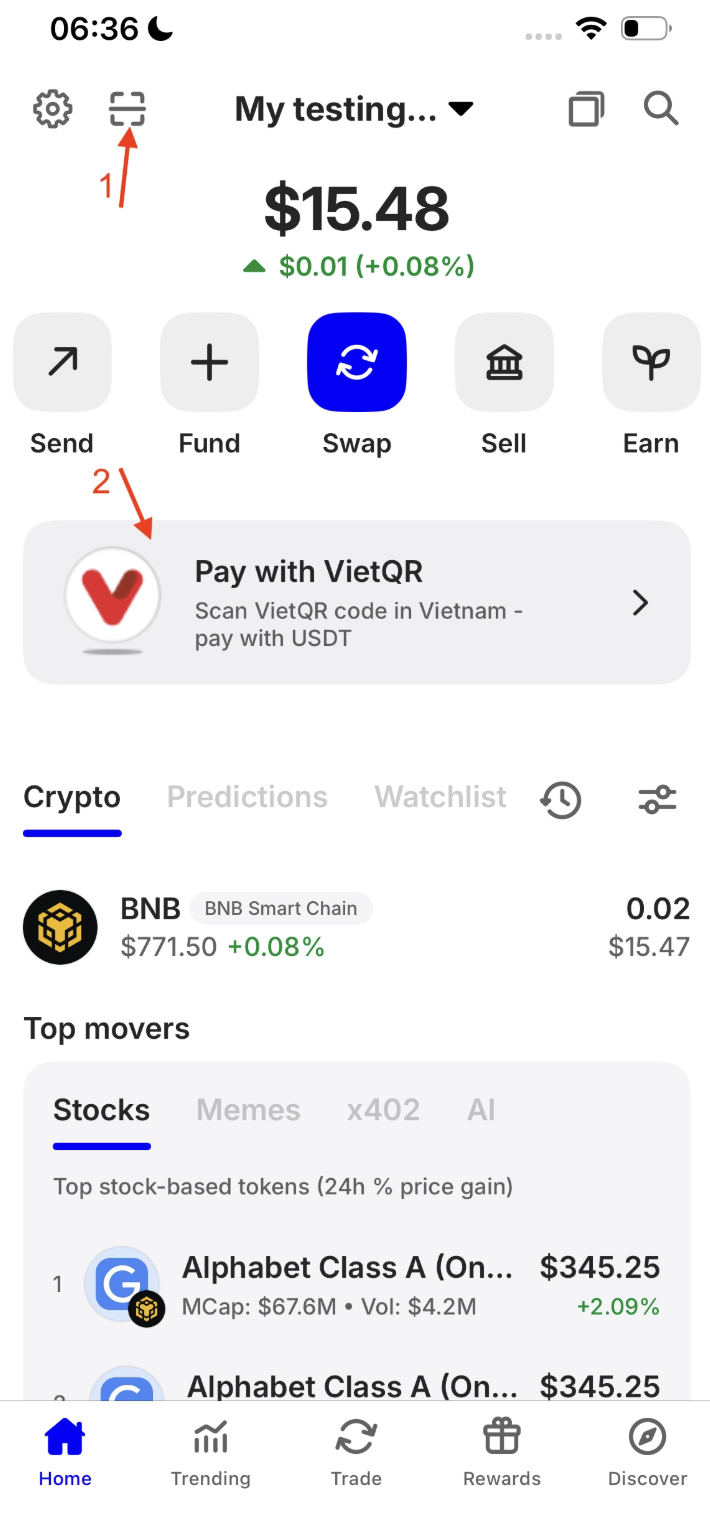
* Screenshot is for illustrative purposes only; prices do not reflect updated USD values.
How Is the Exchange Rate Determined?
The exchange rate for your crypto payments is typically determined by real-time market rates at the moment you confirm the transaction. These rates are transparently reflected within your Trust Wallet app before you complete your payment, ensuring you're always aware of the value.
The QR Code Isn’t Scanning — What Should I Do?
If you're having trouble scanning a QR code, don't worry, here are a few things you can try:
- Check your internet connection: Make sure it’s stable.
- Ensure clarity: Your phone's camera should be clear, and the QR code itself should be well-lit and not blurry.
- Adjust lighting: Try adjusting your screen brightness or refreshing the code on the merchant's display if needed.
- List of supported QR codes:
QR Codes Supported
| Code | Bank / Service Name | Code Number |
|---|---|---|
| VCB | Ngân hàng TMCP Ngoại Thương Việt Nam (Vietcombank) | 970436 |
| DAB | Ngân hàng TMCP Đông Á (DongA Bank) | 970406 |
| TCB | Ngân hàng TMCP Kỹ Thương Việt Nam (Techcombank) | 970407 |
| MB | Ngân hàng TMCP Quân Đội (MBBank) | 970422 |
| VIB | Ngân hàng TMCP Quốc tế (VIB) | 970441 |
| ICB | Ngân hàng TMCP Công Thương (VietinBank) | 970415 |
| EXB | Ngân hàng TMCP Xuất Nhập Khẩu Việt Nam (Eximbank) | 970431 |
| ACB | Ngân hàng TMCP Á Châu (ACB) | 970416 |
| HDB | Ngân hàng TMCP Phát Triển Nhà TP.HCM (HDBank) | 970437 |
| MSB | Ngân hàng TMCP Hàng Hải (Maritime Bank) | 970426 |
| NCB | Ngân hàng TMCP Quốc Dân (NCB) | 970419 |
| VAB | Ngân hàng TMCP Việt Á (VietA Bank) | 970427 |
| VPB | Ngân hàng TMCP Việt Nam Thịnh Vượng (VPBank) | 970432 |
| STB | Ngân hàng TMCP Sài Gòn Thương Tín (Sacombank) | 970403 |
| BAB | Ngân hàng TMCP Bắc Á (BAC A Bank) | 970409 |
| GPB | Ngân hàng TM TNHH MTV Dầu Khí Toàn Cầu (GPBank) | 970408 |
| AGB | Ngân hàng Nông Nghiệp và PTNT (Agribank) | 970405 |
| BIDV | Ngân hàng Đầu tư và Phát triển Việt Nam (BIDV) | 970418 |
| OJB | Ngân hàng TMCP Đại Dương (OceanBank) | 970414 |
| PGB | Ngân hàng TMCP Xăng Dầu Petrolimex (PGBank) | 970430 |
| SHB | Ngân hàng TMCP Sài Gòn - Hà Nội (SHB) | 970443 |
| TPB | Ngân hàng TMCP Tiên Phong (TPBank) | 970423 |
| NAB | Ngân hàng Nam Á (Nam A Bank) | 970428 |
| SGB | Ngân hàng Sài Gòn Công Thương (SaigonBank) | 970400 |
| ABB | Ngân hàng TMCP An Bình (ABBANK) | 970425 |
| SCB | Ngân hàng TMCP Sài Gòn (SCB) | 970429 |
| IVB | Ngân hàng TNHH Indovina (IVB) | 970434 |
| VCCB | Ngân hàng TMCP Bản Việt | 970454 |
| OCB | Ngân hàng TMCP Phương Đông (OCB) | 970448 |
| SEA | Ngân hàng TMCP Đông Nam Á (SeABank) | 970440 |
| LVB | Ngân hàng TMCP Lộc Phát Việt Nam (LPBank) | 970449 |
| WRB | Ngân hàng TNHH Woori Việt Nam | 970457 |
| SHNB | Ngân hàng Shinhan Việt Nam | 970424 |
| PVCB | Ngân hàng TMCP Đại Chúng Việt Nam (PVcomBank) | 970412 |
| PBVN | Ngân hàng Public Bank Việt Nam | 970439 |
| KLB | Ngân hàng Kiên Long | 970452 |
| BVB | Ngân hàng BaoVietBank | 970438 |
| UOB | United Overseas Bank Vietnam | 970458 |
| VRB | Ngân hàng Liên doanh Việt - Nga | 970421 |
| VB | Ngân hàng TMCP Việt Nam Thương Tín | 970433 |
| HSBC | HSBC Việt Nam | 458761 |
| HLB | Hong Leong Bank Vietnam | 970442 |
| SC | Standard Chartered Bank Vietnam | 970410 |
| CBB | Ngân hàng Xây dựng Việt Nam | 970444 |
| COOPBANK | Ngân hàng Hợp tác xã Việt Nam | 970446 |
| CAKE | CAKE by VPBank | 546034 |
| KBHN | Kookmin Bank – CN Hà Nội | 970462 |
| UBANK | Ubank by VPBank | 546035 |
| NHBHN | NongHyup Bank – CN Hà Nội | 801011 |
| KBANK | Kasikornbank Vietnam | 668888 |
| BNP | BNP Paribas Vietnam | 963666 |
| CIMB | CIMB Vietnam | 422589 |
| DBS | DBS Bank Vietnam | 796500 |
| KBHCM | Kookmin Bank – CN HCM | 970463 |
| IBK | Industrial Bank of Korea – CN Hà Nội | 970455 |
| TIMO | Timo Digital Bank | 963388 |
| UMEE | Umee Digital Bank | 963399 |
| IBKHCM | Industrial Bank of Korea – CN HCM | 970456 |
| CTB | Citibank Vietnam | 533948 |
| MAFC | Mirae Asset Finance Vietnam | 977777 |
| KEBHANAHN | KEB Hana Bank – CN Hà Nội | 970467 |
| KEBHANAHCM | KEB Hana Bank – CN HCM | 970466 |
| VNSPB | Ngân hàng Chính sách Xã hội Việt Nam | 999888 |
| LIOBANK | Liobank | 963369 |
| VNPTMONEY | VNPT Money | 971011 |
| VIETELMONEY | Viettel Money | 971005 |
| CUBHCM | Cathay United Bank | 168999 |
| BIDC | Ngân hàng Đầu tư & Phát triển Campuchia | 555666 |
| VIKKI | Vikki by HDBank | 963311 |
| BOCHK | Bank of China (Hong Kong) | 963688 |
| MVAS | Mobifone Digital Service Center | 971032 |
| MOMO | MoMo E-Wallet | 971025 |
| ZALOPAY | ZaloPay | 971101 |
How Long Does a QR Payment Take?
We're committed to fast and efficient transactions. Most QR Pay payments confirm in less than a minute, though this can sometimes vary depending on current network conditions. You can always check the status of your payment quickly and easily in your Trust Wallet transaction history.
Can I Cancel a Payment After Sending It?
It's important to remember that once a crypto payment is confirmed on the blockchain, it can’t be reversed or canceled. We encourage you to always double-check all transaction details carefully before you send, reinforcing your ownership and control over your assets.
I Paid But the Merchant Hasn’t Received the Funds — What Now?
If you've made a payment and the merchant hasn't received the funds, here’s what you should do:
- Check your transaction status: See if your transaction shows as "confirmed" in your Trust Wallet history.
- Wait for confirmation: If it’s still pending, please allow a little more time for network confirmation.
- Contact support: If the transaction is confirmed but the merchant still hasn't received the funds, please contact support. Make sure to have your Order ID ready, as this will help us assist you faster.
How Do I Know a QR Code Is Safe?
Your security is our top priority. To ensure a safe QR Pay experience, always:
- Only scan codes from trusted merchants or verified sources.
- Avoid scanning codes sent via random messages, unofficial channels, or those that look suspicious.
Why Does It Say “Invalid QR”?
Encountering an "Invalid QR" message can be frustrating, but it’s often due to simple issues:
- Weak internet connection: Ensure you have a strong signal.
- Blurry or dim QR code: Make sure the code is clear and well-lit.
- Low screen brightness: Increase your device's screen brightness if needed.
Try rescanning or asking the merchant to refresh their QR code display.
Do I Need to Update My Trust Wallet App?
Keep Your Trust Wallet Updated for Smooth QR Pay
For the best QR Pay experience, please keep your Trust Wallet app updated to the latest version. QR Pay works only on Trust Wallet versions iOS 11.72.2 and 8.82.8 and above. Updating ensures optimal QR scanning functionality.
How Can I Contact Support?
If you need further assistance with QR Pay, especially concerning a payment that failed or funds that didn’t arrive, you can reach out via the Trust Wallet Help Center. For direct support related to these payment issues, you can also contact Wello Support at support@wellowallet.com or use their messenger at https://intercom.help/wellowealth/en/. Remember to include the order ID for any payment-related inquiries so we can help you promptly.
What’s Next for QR Code Payments?
We’re excited about the future of QR Pay and are continuously working to enhance your experience. While we plan to expand support to other blockchains soon, we do not have a timeline to share yet.
Our goal remains to give you full control over your assets and unlock more opportunities in Web3. Stay tuned for updates as we build a seamless, user-friendly QR Pay experience!
Watch a quick recording of the process for better guidance.
Was this article helpful?
That’s Great!
Thank you for your feedback
Sorry! We couldn't be helpful
Thank you for your feedback
Feedback sent
We appreciate your effort and will try to fix the article